Spill, coffee or rain on a MacBook? This short MacBook liquid damage Karachi first-aid list helps before you walk in.
First aid
- Power off immediately
- Do not charge
- Do not use a hair dryer or oven
- Bring it for board cleaning and recovery options
Walk-in lab
macos.pk — independent Macintosh laboratory at Shop GD-07, Techno City Mall. Apple Silicon M-series and Intel. Diagnosis before approved work.
Call / WhatsApp 0331-3230055 · MacBook liquid damage repair · MacBook repair Karachi services
MacBook liquid damage Karachi first aid: step by step
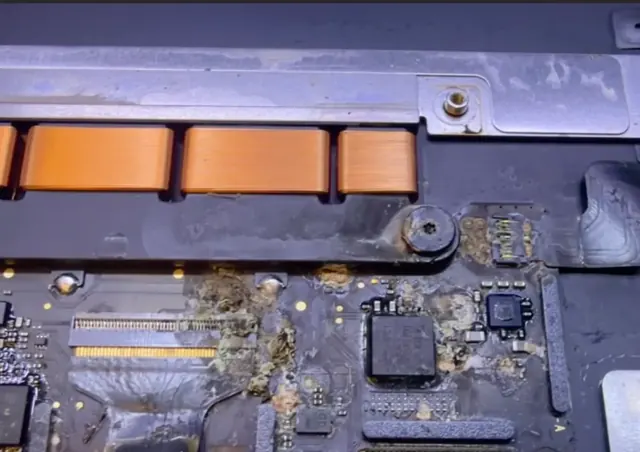
- Shut it down now. Hold the power button for about 10 seconds until the screen goes black. Don't wait to save work.
- Unplug everything — charger, drives, dongles.
- Drain it. Open the lid and place the MacBook upside down like a tent on a towel, so liquid can run out of the keyboard instead of deeper inside.
- Wipe the outside with a dry cloth. Don't shake it hard.
- No heat, no rice. A hair dryer pushes liquid further in and can warp parts; rice doesn't remove the residue that causes corrosion.
- Don't switch it on to test. Power flowing through a wet board is what causes most of the damage.
- Bring it in as soon as possible — ideally the same day. Tell us what was spilled and when.
What we do at the lab
We disconnect the battery first, open the Mac and inspect the logic board under a microscope. The board is cleaned ultrasonically, corroded components are replaced with micro-soldering, and the keyboard, trackpad and ports are tested. If your data matters most, we plan the repair around recovering it.
Common first-aid mistakes we see
- Charging it "to check". Plugging in a wet Mac sends full power through the liquid and turns a cleanable board into one with burnt components.
- Waiting a week for it to dry. The water evaporates but the minerals and sugar stay behind and keep corroding the board. The Mac may even work for a few days before failing.
- Opening it with the wrong tools. Pentalobe screws strip easily, and lifting the bottom case without disconnecting the battery risks a short.
- Using alcohol or cleaners on the keyboard. They can wash residue deeper under the keys and onto the board below.
Will my data survive?
Often, yes — but it depends on the model. On most Apple Silicon and T2-chip Macs the storage is soldered to the logic board and encrypted, so the data can only be read when that board works again. That is why we repair the board rather than replacing it whenever your files matter. Tell us at drop-off if you need your data, and keep a backup habit once the Mac is back — Time Machine to an external drive is the simplest option.
How long does a spill repair take?
A light spill caught early can be cleaned and tested the same day. Heavier corrosion needs ultrasonic cleaning, drying and component replacement, which usually takes longer. You get the diagnosis and the estimate first, and nothing is repaired until you approve it.
Apple's hardware warranty does not cover liquid damage. See our liquid damage repair service, read what happens in the first 24 hours, or call 0331-3230055 now.
MacBook Liquid Damage: First Steps Before Repair (Karachi)
Note: Every MacBook is different. The information below is general guidance for awareness only. Final diagnosis, parts availability, repair options and pricing are confirmed after physical inspection. Repair outcomes vary by model and condition. Please also read our Terms & Conditions and Warranties pages.
Liquid spills (water, tea, coffee, soft drinks) are a frequent cause of MacBook faults in Pakistan’s humid climate and busy workspaces. This article shares cautious first steps. It is not a DIY repair manual — opening a MacBook incorrectly can cause further damage.
Safer first steps after a spill
- Power off immediately if it is still on
- Unplug the charger and any accessories
- Do not charge the device
- Avoid shaking or placing it on a heater / oven / hair dryer
- Do not “test” repeatedly by turning it on — that can worsen corrosion
- Contact a repair shop promptly for assessment
What technicians may check
Depending on the spill, inspection may include checking for corrosion, shorted components, keyboard/trackpad impact, and logic-board condition. Some devices are repairable; others may have limited options. We explain findings before any paid work proceeds, subject to our workshop terms.
Learn more: MacBook liquid damage repair.
For a no-obligation discussion about your MacBook, contact macos.pk (Karachi walk-in or courier from other cities in Pakistan): Free estimate · Contact · Call/WhatsApp +92-331-3230055.
Related: MacBook repair near me in Karachi · MacBook repair in Karachi · repair-shop checklist · contact macos.pk.
New guides: MacBook repair Karachi walk-in · Pro & Air repair checklist · MacBook repair in Karachi.
MacBook liquid damage: what happens in the first 24 hours
Within minutes, liquid bridges tiny contacts on the logic board. Even when a MacBook looks "off", the battery keeps some circuits powered — that is why corrosion starts quickly and why the first thing we do at the lab is disconnect the battery. Over hours and days the residue turns into green or white corrosion that eats away at components and connectors.
Sugary drinks are the worst: chai with milk and sugar, juice and soft drinks leave sticky residue that conducts electricity. Plain water causes less residue, but still corrodes the board when power flows through it.
What to tell the technician
- What was spilled, roughly how much, and when.
- Whether you tried to switch it on or charge it afterwards.
- Where the liquid went in — keyboard, the side, or the vents.
- Whether the data on it is important, so we can plan for it.
Mistakes that make it worse
Don't charge the Mac to see if it works, don't use a hair dryer, and don't leave it in rice for days — the residue stays and keeps corroding. Shut it down, drain it upside down and bring it to a lab the same day.
Apple's hardware warranty does not cover liquid damage, so independent board-level repair is usually the most affordable route. Read the liquid damage first-aid guide, see our liquid damage repair service or contact us straight away.
Related service: Liquid Damage Repair
General guidance only. Every MacBook is different — diagnosis, parts availability and price are confirmed after inspection. Get a free estimate.