Note: Every MacBook is different. The information below is general guidance for awareness only. Final diagnosis, parts availability, repair options and pricing are confirmed after physical inspection. Repair outcomes vary by model and condition. Please also read our Terms & Conditions and Warranties pages.
A cracked, flickering or dim MacBook display is one of the most common reasons people search MacBook screen replacement Karachi. Below is practical information about symptoms and the usual repair flow — without promising timelines or outcomes for every device.
Common display symptoms
- Cracks or shatter marks after a drop
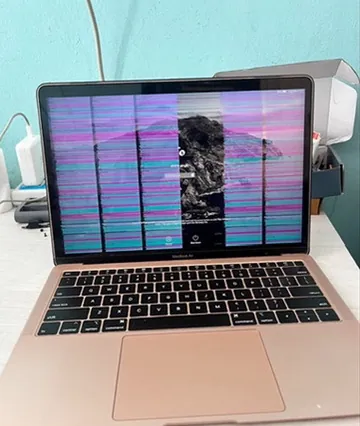
- Vertical / horizontal lines
- Black areas, backlight issues, or very dim image
- Flickering that continues after a reboot
- External monitor works, but the built-in screen does not
Why quotes differ by model
Screen assemblies vary by year (Intel vs Apple silicon, size, resolution). Availability of suitable panels also varies. That is why a written estimate is only meaningful after the technician confirms the exact model and damage type.
Next step
If your screen needs assessment, visit or message macos.pk. Service page: MacBook screen replacement Karachi.
For a no-obligation discussion about your MacBook, contact macos.pk (Karachi walk-in or courier from other cities in Pakistan): Free estimate · Contact · Call/WhatsApp +92-331-3230055.
Related: MacBook repair near me in Karachi · MacBook repair in Karachi · repair-shop checklist · contact macos.pk.
New guides: MacBook repair Karachi walk-in · Pro & Air repair checklist · MacBook repair in Karachi.
MacBook screen replacement step by step
- Confirm the fault. We connect an external display. If it works, the problem is the screen or its cable; if not, the logic board or graphics are checked.
- Check the cable. On many MacBook Pro models a worn display flex cable (FlexGate) causes the problem, and repairing it costs much less than a new screen.
- Choose the part. You get the options — full display assembly or panel — and the part type before any work.
- Fit and test. The new display is fitted, then tested for brightness, colour, dead pixels, the camera and every lid angle.
After the repair
Don't close the lid on a pen, earphones or a thick keyboard cover — that is one of the most common causes of cracked MacBook screens. Clean the display only with a soft, slightly damp microfibre cloth.
Signs your display needs attention
- Coloured vertical or horizontal lines.
- A dark screen with a faint image visible under a torch.
- A "stage-light" glow at the bottom edge, or the screen cutting out at certain lid angles (FlexGate).
- A magenta or pink tint, or bands that spread over time (DustGate).
- Cracks, pressure marks or patches that don't change with the image.
Know your exact model before you ask for a quote — Apple's guide to identify your MacBook Pro model helps. Read what changes a screen price, see our screen replacement service or get a free estimate.
Related service: Screen, FlexGate & DustGate
General guidance only. Every MacBook is different — diagnosis, parts availability and price are confirmed after inspection. Get a free estimate.