MacBook not turning on in Karachi? No-power faults need diagnosis — battery, charging path, or logic board — before any parts order. Apple Silicon M-series and Intel MacBook Pro/Air.
Note: Every MacBook is different. Final diagnosis and pricing are confirmed after physical inspection.
Quick checks before you visit
- Tried a known-good charger and cable?
- Any liquid / spill history?
- Swollen case or trackpad (stop using — fire risk)?
- Any recent drop or FlexGate-style screen flicker?
What we inspect at the lab
- Battery and power path
- Charging port / MagSafe / USB-C path
- Logic board after liquid or surge
macos.pk — independent Macintosh laboratory at Shop GD-07, Techno City Mall (not an Apple Store). Estimate before approved work.
Call / WhatsApp 0331-3230055 · MacBook repair Karachi services
MacBook not turning on: the most common causes
- A fully drained battery. Leave it on the original charger for 30 minutes before deciding it's dead.
- Charger, cable or port. Try another known-good USB-C charger and the other port.
- The Mac is on, but the screen is dark. Press Caps Lock to see if its light turns on, listen for the fan, or connect an external display. If the external screen works, the fault is the display or its cable — see screen repair.
- A software or firmware problem. A failed update can leave a Mac stuck on a black screen.
- A short on the logic board. One failed component can pull a power rail down so the Mac won't start.
- Liquid damage, even from a small spill weeks earlier.
Quick fixes you can try safely
On Apple Silicon Macs, press and hold the power button for about 10 seconds, release it, then press it again. On Intel MacBooks, Apple's SMC reset steps can bring a stuck Mac back. If the Mac starts but macOS won't load, Apple explains how to start up from macOS Recovery.
What we check at the lab
Can my data be saved if the Mac won't start?
Often, yes. On most recent MacBooks the storage is soldered to the logic board and encrypted, so the safest way to reach the files is to repair the board and start the Mac again. That is why we try component-level repair before suggesting a new board. If your files are important, say so at drop-off so we plan the repair around them.
When to stop trying at home
If the Mac gets hot without starting, smells of burning, had a spill, or the battery looks swollen, stop and bring it in. Repeated attempts to charge it can make the damage worse.
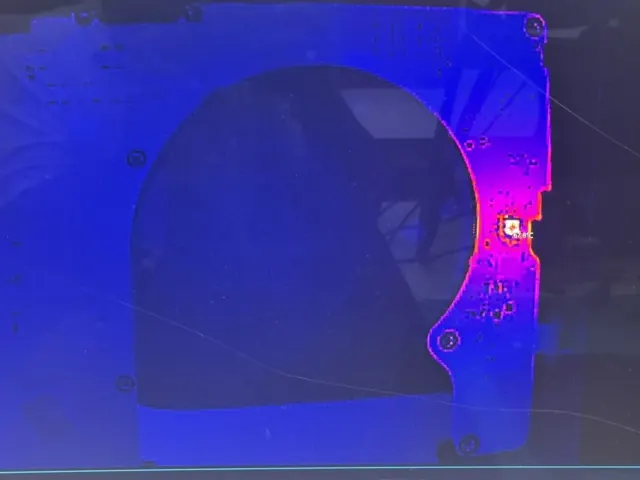
We measure how much power the Mac draws from the charger, check the battery and charging circuit, and use a thermal camera to find shorted components without removing parts blindly. You get the diagnosis and an estimate before any repair — see logic board repair or book a free checkup.
Related service: Not Turning On & Logic Board
General guidance only. Every MacBook is different — diagnosis, parts availability and price are confirmed after inspection. Get a free estimate.