A MacBook that will not turn on, or will not charge, is usually one of four things: the power adapter or cable, a flat battery that needs time, a software hang, or a fault on the logic board. The first three you can check yourself in about twenty minutes. This guide lists the safe checks, in order, and tells you when to stop and bring the Mac to a lab.
1. Check the charger, cable and socket
- Plug the charger into a different wall socket, and avoid extension boards that are loose or worn.
- Try another USB-C cable and adapter that you know works. A damaged cable is one of the most common reasons a MacBook seems "dead".
- Look into the charging port with a torch. Lint and dust pressed into the port can stop the plug from seating fully. Do not use metal tools inside the port.
- Feel the charger. A charger that is completely cold with nothing connected is normal, but one that is very hot, smells burnt or buzzes should be replaced.
2. Give a flat battery time
If the battery ran fully empty, a MacBook may show nothing for the first few minutes on charge. Leave it plugged in for 10 to 15 minutes before you press the power button. On older Intel MacBooks with a MagSafe adapter, check whether the light on the plug turns amber or green.
3. Disconnect everything and try a hard restart
- Unplug external drives, adapters and displays.
- Hold the power button (or Touch ID button) for about 10 seconds, release it, wait a few seconds, then press it once.
- If the screen stays black but you can hear a chime or fans, the Mac may be on and the display is the problem. Shine a torch at the screen: a faint image means the backlight has failed.
4. Look for signs you should stop
- The trackpad or case is lifting. That points to a swollen battery. Stop charging it and read our guide to battery service signs.
- The Mac was wet, or a drink was spilled nearby. Do not keep pressing the power button. Power on a wet board spreads the damage. Follow the liquid damage first-aid steps and bring it in.
- There was a drop, or you see burn marks or smell burning. Unplug it and do not try again.
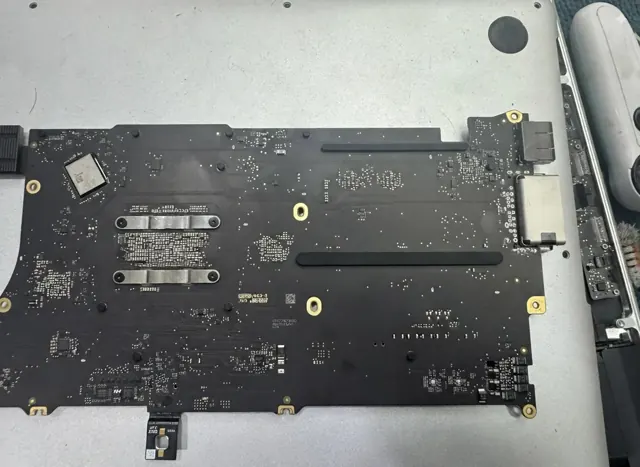
When it is the logic board
If a known-good charger, a rested battery and a hard restart change nothing, the fault is usually on the logic board: the charging circuit, a power-management chip or a short circuit. These faults cannot be fixed by resetting settings. At our lab we diagnose them at component level, using a thermal camera to find the part that is heating up, instead of replacing the whole board. Read more on our not turning on and logic board repair page.
About your data
On Apple Silicon and T2 Macs the storage is soldered to the board and encrypted, so files can usually only be read once the board works again. That is one reason to avoid shops that quote a board replacement without looking at the fault first. If you have a backup, tell us; if you do not, tell us that too, because it changes how carefully the repair is planned.
Bring it to macos.pk
Walk in at Shop GD-07, Ground Floor, Techno City Mall, I.I. Chundrigar Road, Karachi, Monday to Saturday 11 AM to 8:30 PM, for a free checkup. Nothing is repaired until you approve the estimate. Outside Karachi, send the Mac by courier and we diagnose it the same way. Call or WhatsApp 0331-3230055, or ask for a free estimate.
Quick answers
My MacBook will not turn on after the battery drained. Is it broken?
Not necessarily. Charge it for 10 to 15 minutes with a known-good charger, then try the power button. If there is still no sign of life, the charging circuit or the logic board is the likely cause and it needs a diagnosis.
My MacBook is plugged in but says it is not charging. What should I check?
Try another cable, adapter and socket, clean visible lint from the port, and restart the Mac. If a second known-good charger gives the same result, the charging port, the battery or the charging circuit on the board needs checking.
Can I fix a MacBook that will not turn on myself?
The checks above are safe. Opening the case, pulling the battery or pushing chips with tools is not. Wrong steps can turn a small fault into a board-level one, so stop after the checks and bring it in.
Related service: Not Turning On & Logic Board
General guidance only. Every MacBook is different — diagnosis, parts availability and price are confirmed after inspection. Get a free estimate.