Quick answer: MacBook battery swelling is a safety problem, not a cosmetic one. If the trackpad lifts or the case bulges, stop charging the Mac and get the battery replaced.
Introduction
Have you noticed your MacBook’s bottom panel lifting or the trackpad sitting higher than usual?
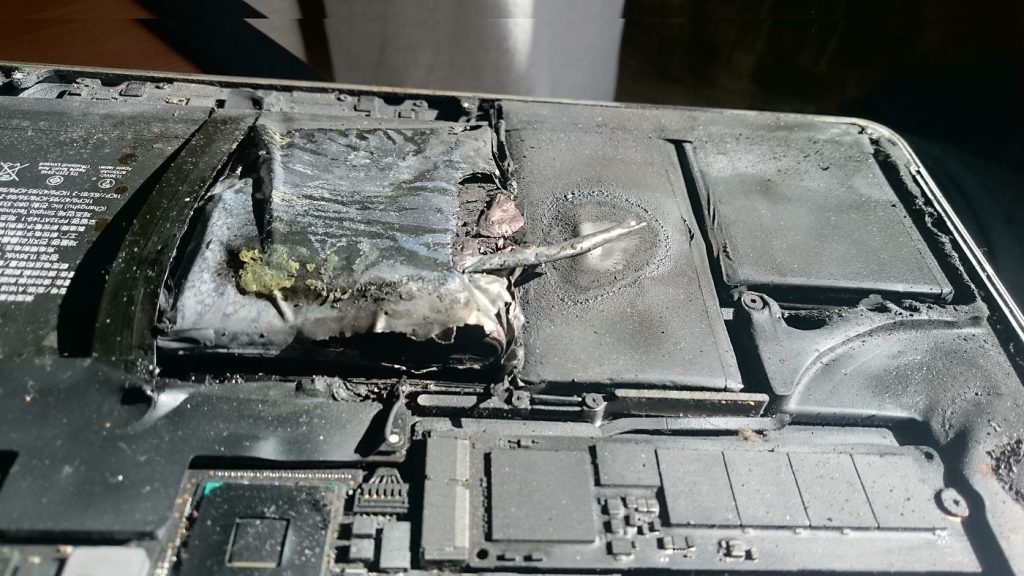
This could be a sign of a swollen or burning battery—a serious issue that can damage your device and even create a fire hazard.
At macos.pk in Karachi, we regularly repair MacBooks with swollen batteries, including those facing the problem of MacBook Battery Burn, and help customers keep their laptops safe.
🔋 Why MacBook Batteries Swell or Burn
Modern MacBooks use Lithium-Polymer (Li-Po) batteries.
Over time, chemical reactions inside the cells can produce gas and heat.
Common triggers include:
- Overcharging or continuous charging (always plugged in).
- Extreme temperatures (leaving the MacBook in a hot car).
- Cheap or fake chargers/adapters.
- Age and heavy usage – every battery has a limited cycle count.
⚠️ Signs of a Swollen Battery
- Trackpad feels tight or clicks unevenly.
- Bottom case bulges or laptop doesn’t sit flat.
- Keyboard keys feel raised.
- Strange chemical smell or excessive heat.
If you notice any of these, stop using the MacBook immediately and disconnect the charger.
🛠️ Safe Handling Tips
- Do not puncture or press the swollen area.
- Power off the MacBook if possible.
- Avoid charging until inspected by a technician.
- Transport carefully — preferably in a fireproof bag if the battery is badly swollen.
✅ Professional Repair in Karachi
At macos.pk at Techno City Mall, our team:
- Diagnoses the battery health and cycle count.
- Replaces the battery with a quality replacement part.
- Checks related components (trackpad, logic board) for liquid or heat damage.
- Completes most repairs within a few hours.
We provide a clean, warranty-backed service so you can use your MacBook safely again.
💡 How to Prevent Future Swelling
- Use only original Apple chargers.
- Keep the battery between 20%–80% for everyday use.
- Avoid leaving the laptop in hot cars or direct sunlight.
- Periodically check battery health in System Settings → Battery → Battery Health.
Need a Safe Battery Replacement?
If your MacBook battery is swollen or overheating, visit macos.pk
MacBook battery swelling: what to do today
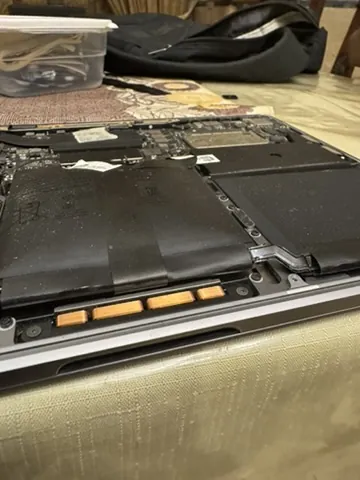
A lithium-polymer battery swells when gas builds up inside its cells — usually from age, heat, deep discharge or a poor-quality charger. Karachi heat and laptops left charging for days on UPS power make MacBook battery swelling more common than most people expect.
- Stop charging and shut the MacBook down.
- Don't press the bulge or try to flatten the case — a punctured cell can catch fire.
- Keep it away from heat — not in a hot car, a closed bag or on a bed.
- Back up your data if the Mac still starts, then bring it in.
How we replace a swollen battery safely
We open the case without pressing on the cells, release the adhesive carefully and lift the battery out in one piece. Then we check what the swelling has damaged — the trackpad, keyboard cables and display hinge area are the usual victims — before fitting a new model-specific battery and testing charging and battery health. Old cells are packed for safe disposal, never thrown in normal waste.
Want to know how worn your battery is before it swells? Apple explains how to check the battery cycle count on a Mac laptop. See our battery replacement service, read about Service Recommended and swollen signs, or request a free estimate.
Related service: Battery Replacement
General guidance only. Every MacBook is different — diagnosis, parts availability and price are confirmed after inspection. Get a free estimate.